
Run Pi Pocket on a remote server
Your Pi agent on your phone, running on a VM that never sleeps.
Shelley handles the setup. About 10 minutes.
Prefer a terminal?
curl -fsSL https://exe-staging.dev/deploy/pi-pocket/prompt.txt | ssh exe.dev new --prompt=/dev/stdinPi Pocket puts the Pi coding agent in a web app made for phones: sessions you start from the couch, push notifications when Pi finishes or wants approval, dictation, and a home-screen icon. It's multiplayer, too: invite people to watch or steer the same session live, with a side chat Pi doesn't see. Underneath is Pi Durable, so a run survives the server restarting halfway through.
Pi Pocket runs on a machine of your own, not a hosted service, and your phone reaches it through a tunnel or Tailscale. An exe.dev VM is a machine of your own that doesn't sleep or close its lid, with an HTTPS address behind your exe.dev login, so notifications and the home-screen app work without a tunnel. Models come from exe.dev's LLM integration, so there's no API key to paste, and Pi gets a machine of its own to run commands on.
Note
Pi Pocket is new and changes daily. This page installs 0.27, the current release, and was checked with 0.27.0.
What you get#
- Pi Pocket at
https://<vm>.exe.xyz/, behind exe.dev's login, restarted by systemd after a crash or reboot. - Claude and GPT models through exe.dev's LLM integration. No API key on the VM.
- The owner's sign-in link, read from Pi Pocket's settings rather than its log.
- Nightly backups of Pi Pocket's and Pi's settings, and one checked to hold the database.
What's running, and where
https://my-pi-pocket.exe.xyz/
Pi Pocket, behind your exe.dev login and Pi Pocket's own sign-in link
https://my-pi-pocket.exe.xyz/
People you share the VM with and invite from the app
Deploy with Shelley#
Click Deploy and Shelley will set up Pi Pocket on a new VM, then check that it works. No config-file wrangling required.
Prefer a terminal?
curl -fsSL \
  https://exe-staging.dev/deploy/pi-pocket/prompt.txt \
  | ssh exe.dev new --prompt=/dev/stdin
What Shelley is told
Set up Pi Pocket on this VM by following the exe.dev recipe at https://exe-staging.dev/deploy/pi-pocket.md from top to bottom.

The recipe's example VM name is my-pi-pocket. This VM's name is the output of `hostname`: use it wherever the recipe writes my-pi-pocket. Skip the step that creates the VM; you are on it.

You are done when all of these are true. Check each one yourself:
- Pi Pocket at `https://<vm>.exe.xyz/`, behind exe.dev's login, restarted by systemd after a crash or reboot.
- Claude and GPT models through exe.dev's LLM integration. No API key on the VM.
- The owner's sign-in link, read from Pi Pocket's settings rather than its log.
- Nightly backups of Pi Pocket's and Pi's settings, and one checked to hold the database.

Read the whole recipe, including the closed details. Follow "Install by
hand" first, skipping VM creation; the walkthrough is for the owner
afterwards. Do not run the later Restore or Update instructions.
Keep the VM private: never run share set-public, because whoever can
steer a session can run commands with sudo. On an existing VM, ask
before replacing ~/.pi/agent/models.json or anything that listens on
port 8000. Don't start an interactive pi or a Pi Pocket session.
Verify that pi-pocket.service and pi-pocket-backup.timer are enabled,
that /api/providers lists anthropic and openai as configured, the pi
OK reply, and a backup that holds .pi-pocket/pocket.sqlite.
Finish with the owner's sign-in link from "Sign in" (it's a key: send it
only to the owner, here), and tell them to sign in to exe.dev when asked,
then pick a model from the model chip in their first session.

Finish with the URLs I should open.
Also at /deploy/pi-pocket/prompt.txt. The recipe it follows is /deploy/pi-pocket.md.
Sign in#
Pi Pocket's owner link is the key to the server. On your computer, print it:
ssh my-pi-pocket.exe.xyz 'echo "https://$(hostname).exe.xyz/login?token=$(jq -r .ownerToken ~/.pi-pocket/config.json)"'
Open it on your computer and sign in to exe.dev if asked. Keep the link private; anyone who has it, and can get past exe.dev's login, is you.
Tap New, keep the projects folder, and Open. The model chip in
the message box says no model: tap it and pick one, such as Claude
Sonnet 5.5. New sessions start with the last model picked. Then try:
Look around this VM and describe it in three lines.
To see the durable part, ask Pi to count to 30 with bash, one number a second, and restart Pi Pocket while it counts. On your computer:
ssh my-pi-pocket.exe.xyz sudo systemctl restart pi-pocket
The command shows as cut off by a restart, and Pi carries on from there.
Put it in your pocket#
On your computer, open the rail's People (two heads) → Invite someone, tick Sign in as me (owner), and scan the QR code with your phone. Sign in to exe.dev on the phone when it asks; the invite lasts 15 minutes, which is plenty.
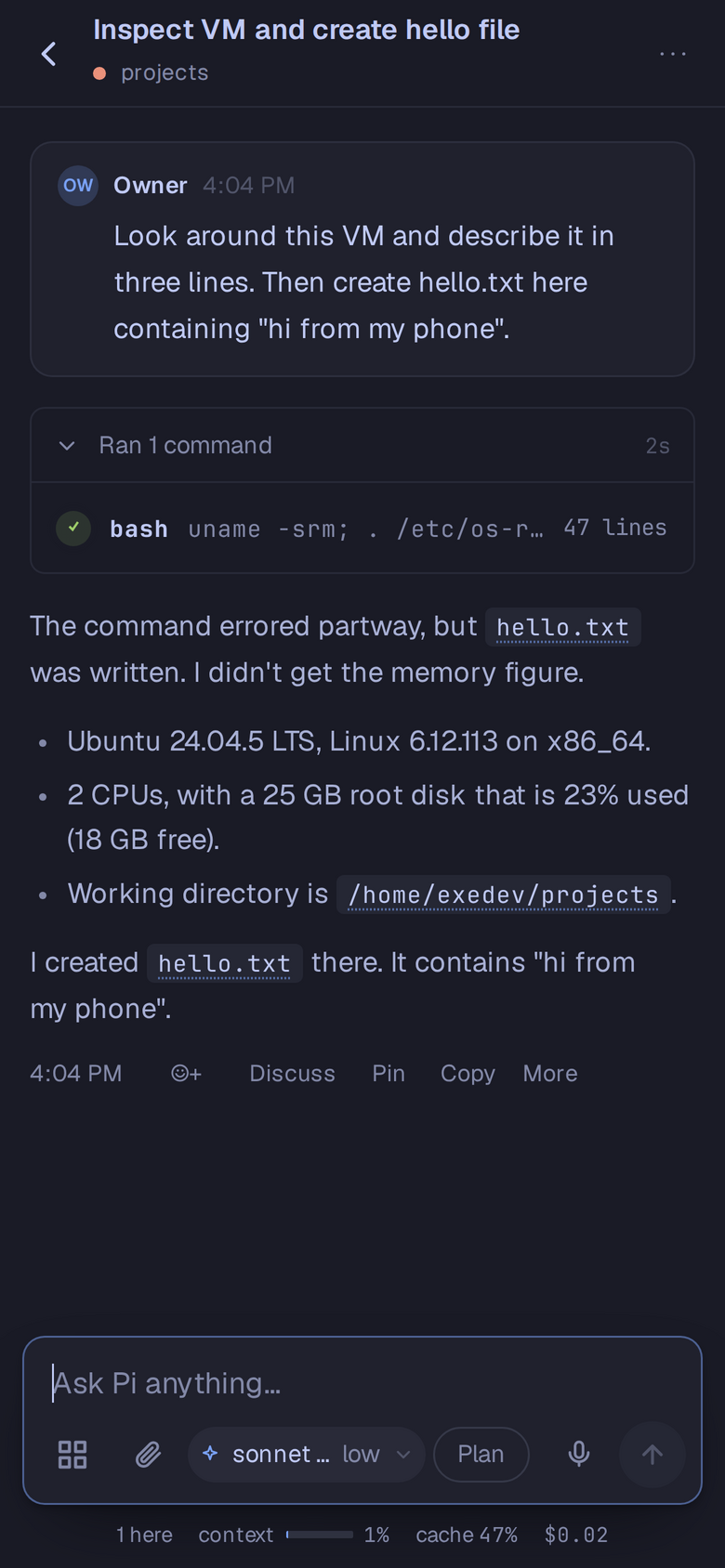
Then, on the phone:
- Add to Home Screen from the browser's share menu, for a full-screen app.
- Menu → Notifications to get a push when Pi finishes, needs an approval, or someone mentions you. They need HTTPS, which the VM's address already has.
Bring people in#
On your computer, let them past exe.dev's login:
ssh exe.dev share add my-pi-pocket ann@example.com
Then, in Pi Pocket, People → Invite someone: choose Steer or View only, how long the invite lasts, and send Ann the link. She opens it, signs in to exe.dev, and picks a name. Everyone in a session sees who's there, and Pi's work, live.
Warning
Anyone who can steer can make Pi run any command on this VM, with sudo. Invite only people you'd hand a terminal to, use View only for the rest, and never make the VM public.
Keep it safe#
Everything that isn't your code is in two folders on the VM:
~/.pi-pocket (sessions, people, settings, uploads) and ~/.pi/agent
(Pi's models and sign-ins). Each night between 03:30 and 04:00 UTC, Pi
Pocket stops for a few seconds while both are copied to
~/pi-pocket-backups; runs in progress pick up again. The backups hold
the owner token, so copy them somewhere private, off the VM. On your
computer:
rsync -av my-pi-pocket.exe.xyz:pi-pocket-backups/ ./pi-pocket-backups/
Your code in ~/projects isn't in them: push it to a Git remote, or copy
the whole VM with ssh exe.dev cp my-pi-pocket my-pi-pocket-copy.
The nuts and bolts#
Happy clicking Deploy? You can stop here. These are the setup steps Shelley follows, plus the commands for later.
Install by hand
Create a VM#
On your computer (pick another name if my-pi-pocket is taken):
ssh exe.dev new --name=my-pi-pocket
ssh my-pi-pocket.exe.xyz
All remaining installation commands run on the VM, as exedev.
Install Node.js 24#
Pi Pocket needs Node.js 22.19 or newer. NodeSource's package installs Node.js 24:
curl -fsSL https://deb.nodesource.com/setup_24.x | sudo -E bash -
sudo apt-get install -y nodejs
node --version
Expect v24.22.1 or later.
Install Pi Pocket#
Install it into ~/.local, a folder exedev owns, so Pi Pocket can
update itself from its menu later:
npm install -g --prefix ~/.local --no-audit --no-fund pi-pocket@0.27
~/.local/bin/pi-pocket --help | head -1
The help starts Pi Pocket: a durable, multiplayer, mobile-first web app for Pi agents. npm warns that @google/genai and protobufjs have
install scripts it didn't run; Pi Pocket needs neither.
Connect the models#
Pi Pocket uses Pi's own model settings in ~/.pi/agent. This file sends
Pi's Anthropic and OpenAI models to exe.dev's
LLM integration, which adds the credentials on
its way out; the key in it is a placeholder. The Pi command line on this
VM reads the same file:
mkdir -p ~/.pi/agent ~/projects
[ -s ~/.pi/agent/models.json ] || cat > ~/.pi/agent/models.json <<'EOF'
{
  "providers": {
    "anthropic": { "baseUrl": "https://llm.int.exe.xyz/anthropic", "apiKey": "exe-llm-integration" },
    "openai": { "baseUrl": "https://llm.int.exe.xyz/openai/v1", "apiKey": "exe-llm-integration" }
  }
}
EOF
cd ~/projects && pi -p --model anthropic/claude-haiku-5-5 "Reply with exactly: OK" </dev/null
Expect OK. If models.json already existed, the command left it
alone: add the two providers to it yourself.
Start it#
systemd starts Pi Pocket at boot and restarts it if it stops. It listens
on port 8000, so it's at https://<vm>.exe.xyz/; --access lan makes it
listen on the VM's network address, where exe.dev's
HTTPS proxy reaches it:
sudo tee /etc/systemd/system/pi-pocket.service >/dev/null <<'EOF'
[Unit]
Description=Pi Pocket
Wants=network-online.target
After=network-online.target

[Service]
User=exedev
WorkingDirectory=/home/exedev/projects
Environment=PATH=/home/exedev/.local/bin:/usr/local/sbin:/usr/local/bin:/usr/sbin:/usr/bin:/sbin:/bin
ExecStart=/home/exedev/.local/bin/pi-pocket --access lan --port 8000 --cwd /home/exedev/projects
Restart=always
RestartSec=3
KillMode=mixed
TimeoutStopSec=20

[Install]
WantedBy=multi-user.target
EOF
sudo systemctl daemon-reload
sudo systemctl enable --now pi-pocket
until curl -fso /dev/null localhost:8000/style.css; do sleep 1; done
systemctl is-enabled pi-pocket
Expect enabled. Check that Pi Pocket sees the models, using the owner
token:
curl -fsS -H "Authorization: Bearer $(jq -r .ownerToken ~/.pi-pocket/config.json)" \
  localhost:8000/api/providers | jq -r '.[] | select(.configured) | .id'
Expect anthropic and openai.
Set up backups#
The backup script stops Pi Pocket for a few seconds, so the database is
copied whole, and packs ~/.pi-pocket and ~/.pi/agent. It leaves out
Pi's own program files and exe.dev's Pi extension, which come with the VM:
mkdir -p ~/pi-pocket-backups
sudo tee /usr/local/bin/pi-pocket-backup >/dev/null <<'EOF'
#!/bin/sh
# Back up Pi Pocket (~/.pi-pocket) and Pi's settings (~/.pi/agent) to
# ~/pi-pocket-backups/pi-pocket-<UTC time>.tar.gz. Keeps the newest 14.
# Pi Pocket stops while the database is copied; its runs resume after.
set -eu
cd /home/exedev
dest=pi-pocket-backups/pi-pocket-$(date -u +%Y%m%d-%H%M%S).tar.gz
systemctl stop pi-pocket
trap 'systemctl start pi-pocket' EXIT
tar -czf "$dest.partial" --exclude=.pi/agent/bin --exclude=.pi/agent/extensions/exe-dev .pi-pocket .pi/agent
systemctl start pi-pocket
trap - EXIT
chmod 600 "$dest.partial"
chown exedev: "$dest.partial"
mv "$dest.partial" "$dest"
ls -1 pi-pocket-backups/pi-pocket-*.tar.gz | head -n -14 | xargs -r rm --
echo "/home/exedev/$dest"
EOF
sudo chmod 755 /usr/local/bin/pi-pocket-backup
Take one and look inside:
backup=$(sudo pi-pocket-backup)
tar -tzf "$backup" | grep -E 'pocket.sqlite$|config.json$|models.json$'
Expect .pi-pocket/pocket.sqlite, .pi-pocket/config.json, and
.pi/agent/models.json. Then back up every night:
sudo tee /etc/systemd/system/pi-pocket-backup.service >/dev/null <<'EOF'
[Unit]
Description=Back up Pi Pocket

[Service]
Type=oneshot
ExecStart=/usr/local/bin/pi-pocket-backup
EOF
sudo tee /etc/systemd/system/pi-pocket-backup.timer >/dev/null <<'EOF'
[Unit]
Description=Back up Pi Pocket every night

[Timer]
OnCalendar=*-*-* 03:30:00 UTC
RandomizedDelaySec=30m
Persistent=true

[Install]
WantedBy=timers.target
EOF
sudo systemctl daemon-reload
sudo systemctl enable --now pi-pocket-backup.timer
systemctl list-timers pi-pocket-backup.timer
The timer should list its next run. Installation done: sign in.
Back up and restore
On the VM, sudo pi-pocket-backup takes an extra backup and prints its
path. Take one before every update.
Go back to a backup#
This replaces sessions, people, settings and Pi's sign-ins with the backup's, and loses everything since. On the VM:
ls ~/pi-pocket-backups
sudo systemctl stop pi-pocket
rm -rf ~/.pi-pocket
tar -xzf ~/pi-pocket-backups/pi-pocket-20261031-033012.tar.gz -C ~
sudo systemctl start pi-pocket
Use a file from the listing in place of the example. The owner link is the backup's, so signed-in browsers stay signed in.
Move to a new VM#
On the new VM, follow Install by hand through Install
Pi Pocket. Copy a backup across from your computer, for example
scp ./pi-pocket-backups/pi-pocket-20261031-033012.tar.gz my-new-vm.exe.xyz:,
then unpack it on the new VM with mkdir -p ~/projects && tar -xzf ~/pi-pocket-20261031-033012.tar.gz -C ~, and follow Start it and
Set up backups. Copy your projects across too. Stop the old one first,
on the old VM: sudo systemctl disable --now pi-pocket pi-pocket-backup.timer.
The sign-in link now starts with the new VM's address, and everyone signs
in there again.
Update Pi Pocket
Read the release notes first: some versions change the database for good, and then only the backup takes you back. Menu → Update Pi Pocket installs a new release and restarts it, going back by itself if it doesn't start. Or by hand, on the VM:
sudo pi-pocket-backup
npm install -g --prefix ~/.local --no-audit --no-fund pi-pocket@latest
sudo systemctl restart pi-pocket
journalctl -u pi-pocket -n 30 --no-pager | grep -F 'Pi Pocket'
The log should end with Pi Pocket ● running. Betas (pi-pocket@beta)
come out almost daily; they're tested less, and can change stored data.
Something not working?
On the VM:
systemctl status pi-pocket --no-pager
journalctl -u pi-pocket -n 50 --no-pager
- The model picker says No models are available: check
~/.pi/agent/models.json(jq . ~/.pi/agent/models.jsonshows a typo), then restart Pi Pocket.curl https://llm.int.exe.xyz/v1/modelslists what the LLM integration offers this VM. - A model fails with a sign-in error: that provider has a line in
models.jsonand your own sign-in. Keep one of the two (see the FAQ). - The sign-in page keeps coming back: Pi Pocket's cookie belongs to
one address. Use
https://my-pi-pocket.exe.xyz/, not thehttp://10…address the log prints. - Signed out everywhere, or a link leaked: stop the service, run
~/.local/bin/pi-pocket --rotate-token --access lan --port 8000once and press q when it's up, then start the service. Every device that used the old link must sign in again. EADDRINUSEin the log: something else listens on port 8000.
Frequently asked questions#
Why does Pi Pocket ask me to sign in after exe.dev already did?
They're two locks. exe.dev's HTTPS proxy decides who reaches the VM at all; Pi Pocket's sign-in link or invite decides who you are inside it, and what you may do (owner, steer, or view only). Pi Pocket doesn't read exe.dev's X-ExeDev-Email header, so each browser signs in to it once. Its cookie lasts a year.
Can I use my Claude or ChatGPT subscription instead?
Yes, from the Providers sheet. First delete that provider's line from ~/.pi/agent/models.json on the VM and run sudo systemctl restart pi-pocket: the line sends every request for that provider to exe.dev's LLM integration, your own sign-in included.
How is this different from Pi and Pi Durable?
Pi is the terminal coding agent, preinstalled on exe.dev VMs. Pi Durable is Earendil's library for agents that survive a crash. Pi Pocket is an independent web app, by Tanner Middleton, that runs Pi on Pi Durable and adds what a phone needs: a touch UI, notifications, and other people in the same session.
Is it stable?
It's young and moving fast: a release or beta most days since it started in October 2026, and Pi Durable is experimental. Some updates change the database one way, so take a backup before every update. This page was checked with 0.27.0.
What does it cost?
Your VM plan plus model usage, billed to your exe.dev account through the LLM integration. Pi Pocket shows each session's spend under the message box.
Does the Browser panel work?
Not as installed here. It needs Chromium, Chrome, Brave or Edge on the VM, which this recipe doesn't install. The rest of the app doesn't need it.
Updated Oct 31, 2026 · tested end to end Oct 31, 2026 · Markdown · manifest.json · Something wrong? Tell us